In this article we’ll describe how add Energy Saving Certificates (ESCs) to a Quote.
Add ESCs to the Quote
Open the Quote you would like to add ESCs
Click Hot Water
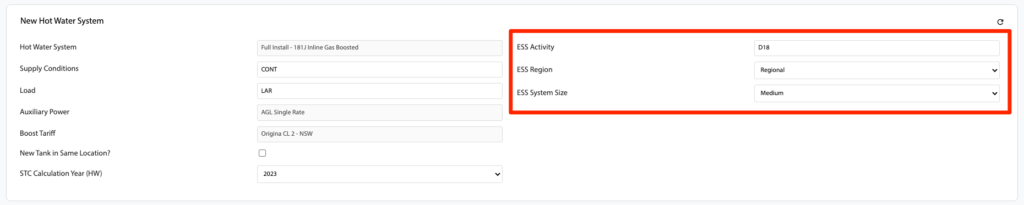
Scroll down to the New Hot Water System section
Select an ESS Activity:
D17 – REPLACE AN EXISTING ELECTRIC WATER HEATER WITH AN (AIR SOURCE) HEAT PUMP WATER HEATER
D18 – REPLACE AN EXISTING ELECTRIC WATER HEATER WITH A SOLAR (ELECTRIC BOOSTED) WATER HEATER
D19 – REPLACE AN EXISTING GAS WATER HEATER WITH AN AIR SOURCE HEAT PUMP WATER HEATER
D20 – REPLACE AN EXISTING GAS WATER HEATER WITH A SOLAR (ELECTRIC BOOSTED) WATER HEATER
D21 – REPLACE AN EXISTING GAS WATER HEATER WITH A SOLAR (GAS BOOSTED) WATER HEATER
Select an ESS Region:
Regional
Metro
Select an ESS System Size:
Small
Medium
Large
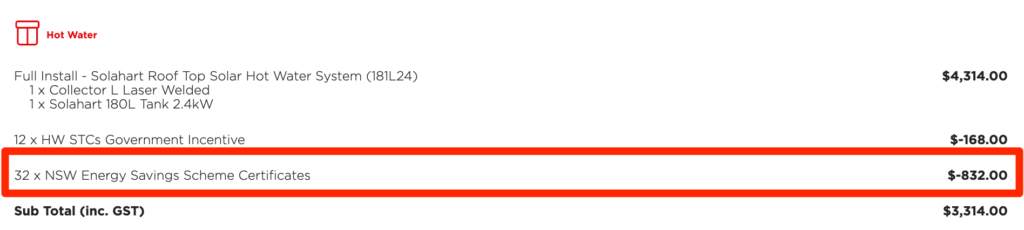
The system will calculate the Energy Saving Certificates based on the New Hot Water System and the two selections above and add them to the Quote automatically (similar to STCs)