In this article we’ll describe how to configure Hubspot Integration. The integration will automatically sync new/updated Customers from Sales App > Hubspot and new Contacts from Hubspot > Sales App. NOTE: Requires a subscription to HubspotCRM.
Configure Field Mapping
Open the Main Menu and scroll down to Configure.
Click Hubspot Integration.
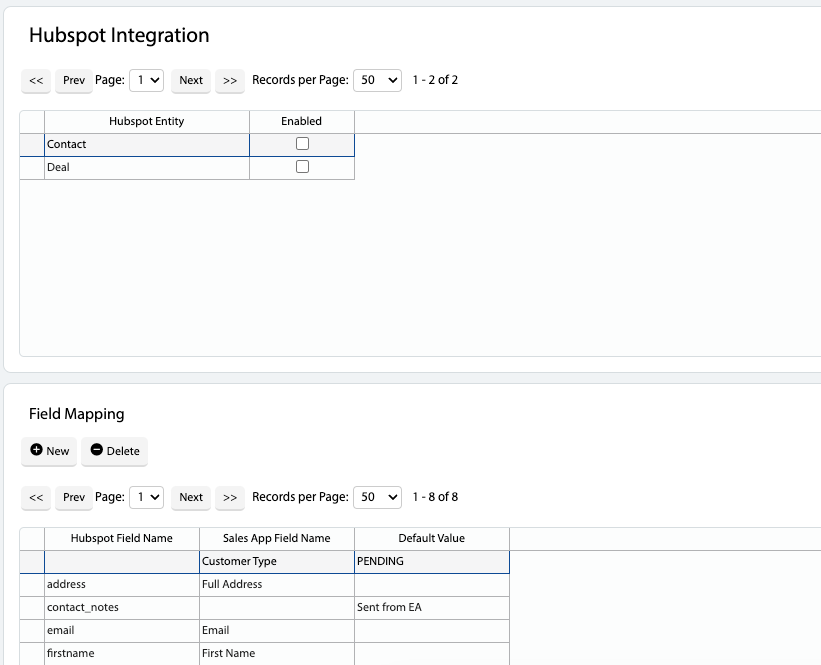
A list of available Hubspot Entities will be shown.
Select an entity and review the Field Mapping:
Hubspot Field Name – Name of the field in Hubspot
Sales App Field Name – Name of the field in Sales App
Default Value – Value to use for the Hubspot/Sales App Field as a default
After reviewing the Field Mapping, click the Enabled tickbox for the selected Hubspot Entity.
Connect to Hubspot
Open the Main Menu and scroll down to Configure.
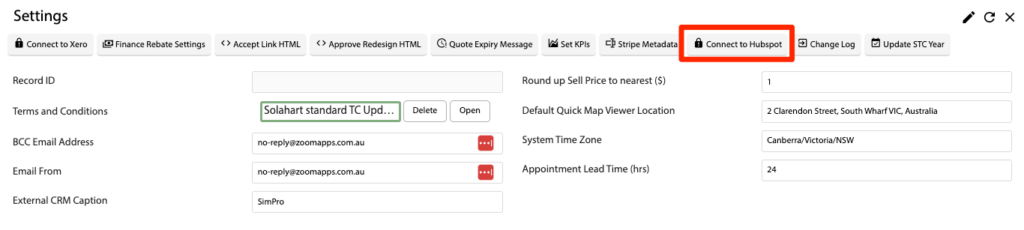
Click Settings.
Click the Connect to Hubspot button.
Follow the connection wizard to setup the connection.
 Added in Version 0.38